Intermec CN2B Manual de usuario Pagina 227
- Pagina / 264
- Tabla de contenidos
- SOLUCIÓN DE PROBLEMAS
- MARCADORES

- CN2B Mobile 1
- Computer 1
- User's Manual 1
- Document Change Record 3
- Contents 10
- Before You Begin 15
- Related Documents 16
- Patent Information 17
- Using the CN2B Computer 19
- Audio System 20
- Battery door latch 22
- Removing the Battery 23
- Maximizing Battery Life 24
- Enabling the Beeper 24
- Key Sequences 26
- PSM Build Version 28
- Resetting Your CN2B Computer 29
- Software Build Version 30
- Software Tools 30
- Storage Media 31
- Fully inserted 32
- Wireless Network Support 33
- Accessories 34
- Windows Mobile 2003 37
- Software Builds 38
- Where to Find Information 38
- Basic Skills 39
- Pop-up Menus 41
- Entering Information 41
- Select an input method 42
- Tap to see your choices 42
- Using Block Recognizer 43
- Using Letter Recognizer 43
- Writing on the Screen 44
- Converting Writing to Text 45
- Drawing on the Screen 46
- Recording a Message 47
- Using My Text 48
- Adjusting Settings 49
- Adding or Removing Programs 49
- Removing Programs 51
- Microsoft ActiveSync 52
- Microsoft Pocket Outlook 53
- Synchronizing Calendar 54
- What’s an All Day Event? 55
- What’s a Recurrence Pattern? 55
- Viewing Appointments 56
- Creating an All Day Event 57
- Sending a Meeting Request 60
- Finding an Appointment 61
- Deleting an Appointment 61
- Changing Calendar Options 61
- Creating a Contact 62
- Synchronizing Contacts 63
- Viewing Contacts 63
- Adding a Note to a Contact 64
- Copying a Contact 65
- Finding a Contact 66
- Deleting a Contact 67
- Changing Contacts Options 67
- Tasks: Keeping a To Do List 68
- Synchronizing Tasks 69
- Creating a Note 70
- Synchronizing Notes 70
- Synchronizing E-mail Messages 72
- Connecting to a Mail Server 73
- Companion Programs 75
- Typing Mode 76
- Writing Mode 77
- Recording Mode 77
- Pocket Excel 78
- Creating a Workbook 79
- MSN Messenger 80
- Signing In and Out 81
- Working with Contacts 82
- Managing Contacts 82
- Sending a Message 83
- Microsoft Reader 84
- Reading a Book 85
- Using Reader Features 85
- Pocket Internet Explorer 86
- Mobile Favorites 87
- Using AvantGo Channels 88
- Browsing the Internet 89
- Installing Applications 91
- Packaging an Application 92
- Using Microsoft ActiveSync 93
- Using the FTP Server 94
- Using Wavelink Avalanche 94
- Updating the System Software 98
- Secure Digital 99
- Press to reset 99
- Installing Cabinet Files 101
- Network Support 103
- Personal Area Networks 104
- Wireless Printing 105
- Properties 105
- Connecting with Bluetooth 106
- Chapter 4 — Network Support 107
- Chapter 4 — Network Support 108
- Local Area Networks 110
- Network Adapters 112
- Network Selection APIs 113
- Network Connections 113
- AutoIP/DHCP 117
- Wide Area Networks 118
- Remote Access (Modems) 118
- Connecting to Work 121
- Ending a Connection 125
- Management 126
- Management Information Base 127
- Object Identifiers 127
- Configuring with SNMP 128
- Printer Support 129
- Printing ASCII 130
- NPCP Printer Driver 130
- About NPCP 131
- Opening the NPCP Driver 131
- Closing the NPCP Driver 132
- Reading from the NPCP Driver 132
- Writing to the NPCP Driver 132
- NPCP Driver I/O Controls 132
- NPCP Printer Communications 133
- Sample Code 134
- NPCP Error Codes 134
- O’Neil Printer Driver 135
- Closing the DTR Driver 136
- Writing to the DTR Driver 136
- DTR Printer Communications 136
- Chapter 5 — Printer Support 137
- Chapter 5 — Printer Support 138
- Scanner Support 139
- Data Collection Configuration 140
- Internal Scanners 141
- Reading Distances 142
- Programming 143
- Creating CAB Files 144
- [CEStrings] 145
- [Strings] 145
- [CEDevice] 145
- [DefaultInstall] 147
- [SourceDiskNames] 147
- [SourceDiskFiles] 148
- [DestinationDirs] 148
- [CopyFiles] 149
- [AddReg] 150
- [CEShortCuts] 151
- Sample .INF File 151
- After the CAB File Extraction 154
- Customization and Lockdown 158
- FTP Server 159
- Synopsis 160
- BlockSize 161
- DeviceName 161
- DeviceURL 161
- IDNATarget 162
- ManifestName 162
- PauseAtStartup 162
- Chapter 7 — Programming 166
- Autostart FTP 167
- Kernel I/O Controls 168
- IOCTL_HAL_ITC_READ_PARM 169
- IOCTL_HAL_ITC_WRITE_SYSPARM 171
- IOCTL_HAL_GET_DEVICEID 172
- IOCTL_HAL_GET_OAL_VERINFO 173
- IOCTL_HAL_WARMBOOT 174
- IOCTL_HAL_COLDBOOT 175
- IOCTL_HAL_GET_RESET_INFO 175
- IOCTL_HAL_GET_BOOT_DEVICE 176
- IOCTL_HAL_REBOOT 177
- IOCTL_PROCESSOR_INFORMATION 177
- IOCTL_GET_CPU_ID 178
- RadioConnect() 180
- Query Information Functions 181
- GetAuthenticationMode() 182
- GetBSSID() 182
- GetDiversity() 183
- GetLinkSpeed() 183
- GetMac() 184
- GetNetworkMode() 184
- GetNetworkType() 185
- GetSSID() 185
- GetPowerMode() 186
- GetRSSI() 186
- GetTXPower() 187
- GetWepStatus() 187
- GetRadioIpAddress() 188
- GetCCXStatus() 188
- Set Information Functions 189
- EncryptionStatus() 190
- SetAuthenticationMode() 191
- SetChannel() 191
- SetNetworkMode() 192
- SetPowerMode() 192
- SetSSID() 193
- SetCCXStatus() 193
- SetMixedCellMode() 193
- Helper Functions 194
- EnableZeroConfig() 195
- StartScanList() 196
- StartSupplicant() 196
- StopSupplicant() 196
- RenewDHCP() 197
- GetCurrentDriverName() 197
- ResetRadioToSystemSave() 198
- EnableSuppLogging() 198
- SwitchPacketDriver() 198
- Notifications 199
- Reboot Functions 200
- Remapping the Keypad 200
- Unshifted Plane 201
- Orange Plane 201
- Alpha (Green) Plane 202
- Change Notification 203
- Advanced Keypad Remapping 203
- Scan Codes 203
- Sample Registry Settings 206
- Configurable Settings 209
- Configuration Parameters 210
- Intermec Settings Applet 210
- Utilities Applet 211
- Wakeup Mask 212
- App Launch 212
- Wireless Network Applet 213
- About the Wireless Network 214
- Terminology 214
- Security 216
- PEAP (Protected EAP) 218
- TLS (EAP-TLS) 220
- TTLS (EAP-Tunneled TLS) 222
- To Get Certificates 225
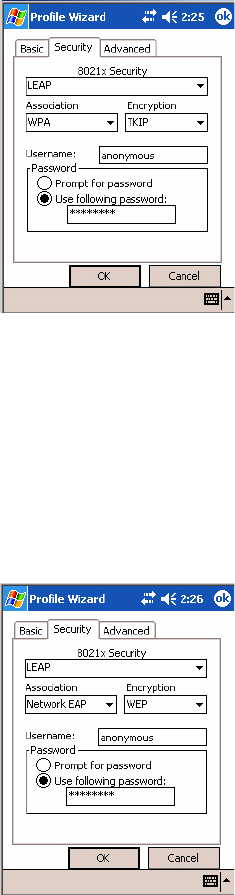
- LEAP (Cisco Lightweight EAP) 226
- Advanced 230
- Other Configurable Parameters 232
- Using Reader Commands 233
- Configuration Bar Codes 234
- Automatic Shutoff 235
- Backlight Timeout 236
- Key Clicks 236
- Preamble 237
- Postamble 237
- Troubleshooting the CN2B 239
- Problems and Solutions 240
- Numerics 246
- *935-001-002* 264
© 2020, manymanuals.es. Todos los derechos reservados | 0.028 s |
 Manymanuals.com
 Manymanuals.de
 Manymanuals.fr
 Manymanuals.it
 Manymanuals.pl
 Manymanuals.cz
 Manymanuals.es
 Manymanuals-pt.com
Comentarios a estos manuales